Docker Compose
To get up and running quickly with Staqr, we will use the Staqr Docker image. Follow these steps:
Prerequisites
You need to have Git and Docker installed on your machine in order to set up Staqr via Docker Compose.
Installing
1. Clone Staqr repository.
Use the command line to clone Staqr repository:
git clone
2. Go to the repository folder.
cd staqr
3.Generate Environment variable
Run the following command from the command prompt / terminal
sh tools/deploy.sh
If none of the above methods work, you can rename the .env.example file in the root directory to .env and fill in the necessary information within the file.
4. Run Staqr.
Please note that "docker-compose" (with a dash) is an outdated version of Docker Compose and it will not work properly. We strongly recommend downloading and installing version 2 from the here to use Docker Compose.
docker compose -p staqr up
4. Configure Webhook URL (Important for Triggers, Optional If you have public IP)
Note: By default, Staqr will try to use your public IP for webhooks. If you are self-hosting on a personal machine, you must configure the frontend URL so that the webhook is accessible from the internet.
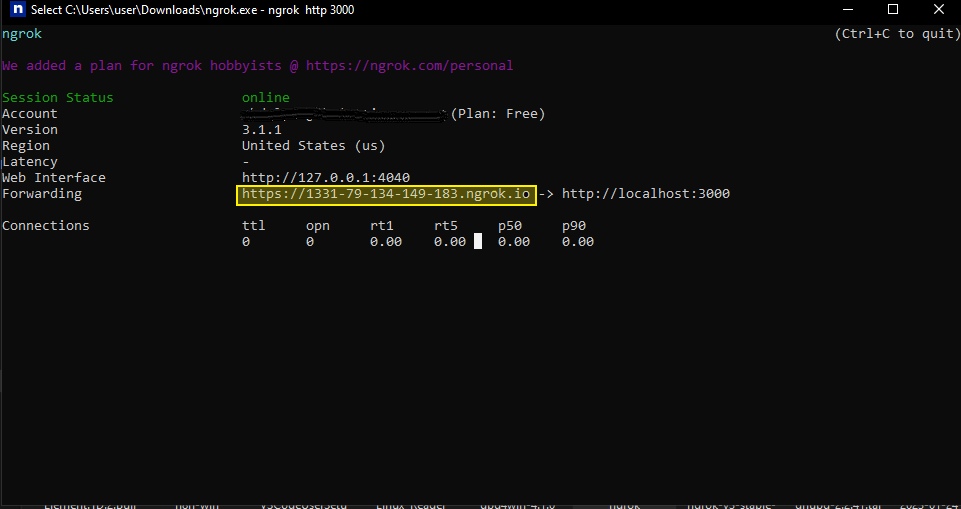
Optional: The easiest way to expose your webhook URL on localhost is by using a service like ngrok. However, it is not suitable for production use.
- Install ngrok
- Run the following command:
ngrok http 8080
- Replace
STAQR_FRONTEND_URLenvironment variable in.envwith the ngrok url.
When deploying for production, ensure that you update the database credentials and properly set the environment variables.
Review the configurations guide to make any necessary adjustments.
Upgrading
To upgrade to new versions, which are installed using docker compose, perform the following steps. First, open a terminal in the staqr repository directory and run the following commands.
Automatic Pull
1. Run the update script
sh tools/update.sh
Manually Pull
1. Pull the new docker compose file
git pull
2. Pull the new images
docker compose pull
3. Review changelog for breaking changes
Please review breaking changes in the changelog.
4. Run the updated docker images
docker compose up -d --remove-orphans
Congratulations! You have now successfully updated the version.
Deleting
The following command is capable of deleting all Docker containers and associated data, and therefore should be used with caution:
sh tools/reset.sh
Executing this command will result in the removal of all Docker containers and the data stored within them. It is important to be aware of the potentially hazardous nature of this command before proceeding.