Docker
This setup is only meant for personal use or testing. It runs on SQLite3 and an in-memory Redis queue, which supports only a single instance on a single machine. For production or multi-instance setups, you must use Docker Compose with PostgreSQL and Redis.
To get up and running quickly with Staqr, we will use the Staqr Docker image. Follow these steps:
Prerequisites
You need to have Git and Docker installed on your machine in order to set up Staqr via Docker Compose.
Install
Pull Image and Run Docker image
Pull the Staqr Docker image and run the container with the following command:
docker run -d -p 8080:80 -v ~/.staqr:/root/.staqr -e STAQR_REDIS_TYPE=MEMORY -e STAQR_DB_TYPE=SQLITE3 -e STAQR_FRONTEND_URL="http://localhost:8080" staqr/staqr:latest
Configure Webhook URL (Important for Triggers, Optional If you have public IP)
Note: By default, Staqr will try to use your public IP for webhooks. If you are self-hosting on a personal machine, you must configure the frontend URL so that the webhook is accessible from the internet.
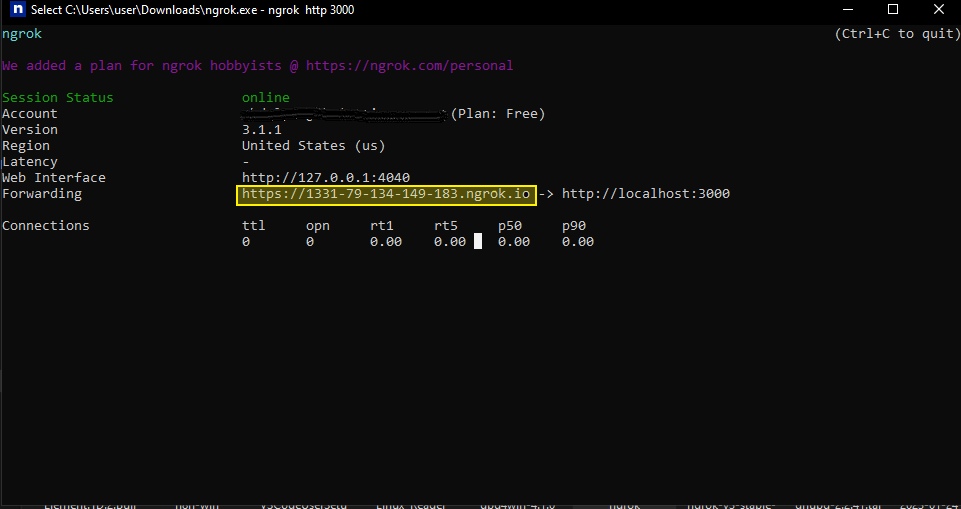
Optional: The easiest way to expose your webhook URL on localhost is by using a service like ngrok. However, it is not suitable for production use.
- Install ngrok
- Run the following command:
ngrok http 8080
- Replace
STAQR_FRONTEND_URLenvironment variable in the command line above.
Upgrade
Please follow the steps below:
Step 1: Back Up Your Data (Recommended)
Before proceeding with the upgrade, it is always a good practice to back up your Staqr data to avoid any potential data loss during the update process.
-
Stop the Current Staqr Container: If your Staqr container is running, stop it using the following command:
docker stop staqr_container_name -
Backup Staqr Data Directory: By default, Staqr data is stored in the
~/.staqrdirectory on your host machine. Create a backup of this directory to a safe location using the following command:cp -r ~/.staqr ~/.staqr_backup
Step 2: Update the Docker Image
- Pull the Latest Staqr Docker Image: Run the following command to pull the latest Staqr Docker image from Docker Hub:
docker pull staqr/staqr:latest
Step 3: Remove the Existing Staqr Container
- Stop and Remove the Current Staqr Container: If your Staqr container is running, stop and remove it using the following commands:
docker stop staqr_container_name
docker rm staqr_container_name
Step 4: Run the Updated Staqr Container
Now, run the updated Staqr container with the latest image using the same command you used during the initial setup. Be sure to replace staqr_container_name with the desired name for your new container.
docker run -d -p 8080:80 -v ~/.staqr:/root/.staqr -e STAQR_REDIS_TYPE=MEMORY -e STAQR_DB_TYPE=SQLITE3 -e STAQR_FRONTEND_URL="http://localhost:8080" --name staqr_container_name staqr/staqr:latest
Congratulations! You have successfully upgraded your Staqr Docker deployment