Predefined Connection
Use predefined connections to allow users to access your integration in the embedded app without re-entering authentication credentials.
The high-level steps are:
- Create a global connection for a seller using the API in the platform admin. Only platform admins can edit or delete global connections.
- (Optional) Hide the connections dropdown in the integration settings.
Prerequisites
- Run the Enterprise Edition
- Create your integration. Later we will customize the integration logic to use predefined connections.
Create a Predefined Connection
Step 1: Create an API Key
Go to Platform Admin → Security → API Keys and create an API key. Save it for use in the next step.
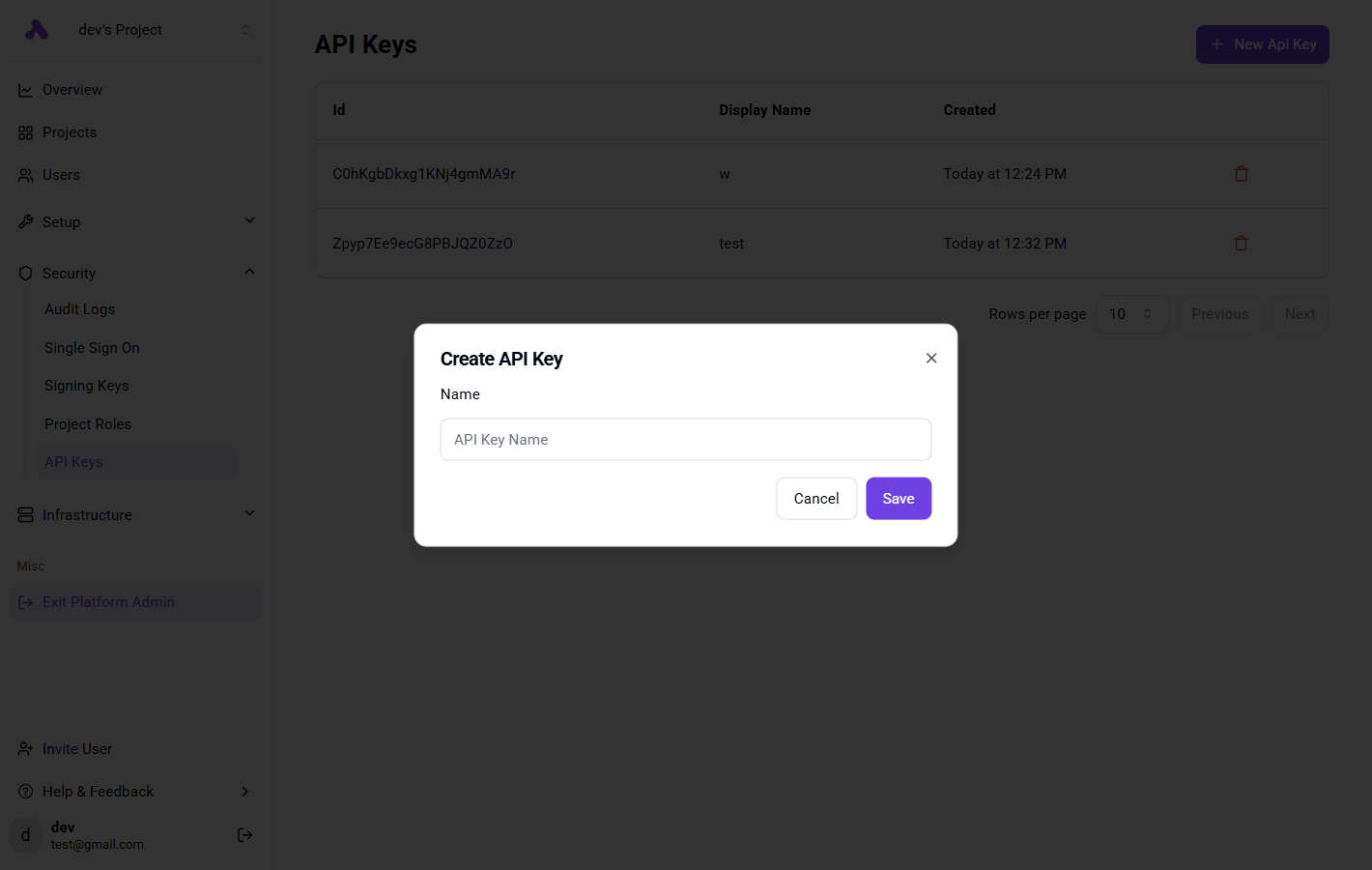
Step 2: Create a Global Connection via API
Add the following snippet to your backend to create a global connection each time you generate the JWT token.
The snippet does the following:
- Create Seller If it doesn't exist.
- Create a global connection for the seller with certain naming convention.
const apiKey = 'YOUR_API_KEY';
const instanceUrl = 'https://cloud.staqr.com';

// The name of the user / organization in your SAAS
const externalSellerId = 'org_1234';
const integrationName = '@staqr/integration-gelato';
// This will depend on what your integration auth type is, can be one of this ['PLATFORM_OAUTH2','SECRET_TEXT','BASIC_AUTH','CUSTOM_AUTH']
const integrationAuthType = "CUSTOM_AUTH"
const connectionProps = {
    // Fill in the props required by your integration's auth
}
const { id: sellerId, externalId } = await getOrCreateSeller({
  sellerExternalId: externalSellerId,
  apiKey,
  instanceUrl,
});

await createGlobalConnection({
  sellerId,
  externalSellerId,
  apiKey,
  instanceUrl,
  integrationName,
  props,
  integrationAuthType
});
Implementation:
async function getOrCreateSeller({
    sellerExternalId,
    apiKey,
    instanceUrl,
}: {
    sellerExternalId: string,
    apiKey: string,
    instanceUrl: string
}): Promise<{ id: string, externalId: string }> {

    const sellers = await fetch(`${instanceUrl}/api/v1/sellers?externalId=${sellerExternalId}`, {
        method: 'GET',
        headers: {
            'Authorization': `Bearer ${apiKey}`,
            'Content-Type': 'application/json'
        },
    })
        .then(response => response.json())
        .then(data => data.data)
        .catch(err => {
            console.error('Error fetching sellers:', err);
            return [];
        });

    if (sellers.length > 0) {
        return {
            id: sellers[0].id,
            externalId: sellers[0].externalId
        };
    }

    const newSeller = await fetch(`${instanceUrl}/api/v1/sellers`, {
        method: 'POST',
        headers: {
            'Authorization': `Bearer ${apiKey}`,
            'Content-Type': 'application/json'
        },
        body: JSON.stringify({
            displayName: sellerExternalId,
            metadata: {},
            externalId: sellerExternalId
        })
    })
        .then(response => response.json())
        .catch(err => {
            console.error('Error creating seller:', err);
            throw err;
        });

    return {
        id: newSeller.id,
        externalId: newSeller.externalId
    };
}

async function createGlobalConnection({
    sellerId,
    apiKey,
    instanceUrl,
    externalSellerId,
    integrationName,
    props,
    integrationAuthType
}: {
    sellerId: string,
    apiKey: string,
    instanceUrl: string,
    externalSellerId: string,
    integrationName: string,
    props: Record<string, any>,
    integrationAuthType
}) {

    const displayName = 'Gelato Connection';
    const connectionExternalId = 'gelato_' + externalSellerId;

    const connection = await fetch(`${instanceUrl}/api/v1/app-connections`, {
        method: 'POST',
        headers: {
            'Authorization': `Bearer ${apiKey}`,
            'Content-Type': 'application/json'
        },
        body: JSON.stringify({
            sellerId,
            name: connectionExternalId,
            externalId: connectionExternalId,
            integrationName,
            value: {
                type: integrationAuthType,
                props,
                scope: connectionExternalId,
                type: integrationAuthType,
            }
        })
    });
}
Hide the Connections Dropdown (Optional)
Step 3: Modify Trigger / Action Definition
Wherever you call createTrigger or createAction set requireAuth to false, this will hide the connections dropdown in the integration settings in the builder,
next we need to fetch it based on a naming convention.
Step 4: Fetch the connection
Here is example how you can fetch the connection value based on naming convention, make sure this naming convention is followed when creating a global connection.
import {
   ConnectionsManager,
   Property,
   TriggerStrategy
} from "@staqr/integrations-framework";
import {
   createTrigger
} from "@staqr/integrations-framework";
import {
   isNil
} from "@staqr/shared";
// Add this import from the index.ts file, where it contains the definition of the auth object.
import { auth } from '../..';

const fetchConnection = async (
	connections: ConnectionsManager,
	projectExternalId: string | undefined,
): Promise<PiecePropValueSchema<typeof auth>> => {
	if (isNil(projectExternalId)) {
		throw new Error('This seller is missing an external id');
	}
	// the naming convention here is gelato_projectExternalId
	const connection = await connections.get(`gelato_${projectExternalId}`);
	if (isNil(connection)) {
		throw new Error(`Connection not found for seller ${sellerExternalId}`);
	}

	return connection as PiecePropValueSchema<typeof auth>;
};


export const newFlavorCreated = createTrigger({
   requireAuth: false,
   name: 'newFlavorCreated',
   displayName: 'new flavor created',
   description: 'triggers when a new icecream flavor is created.',
   props: {
      dropdown: Property.Dropdown({
         displayName: 'Dropdown',
         required: true,
         refreshers: [],
         options: async (_, {
            connections,
            project
         }) => {
            const connection = await fetchConnection(connections, (await seller.externalId()));
            // your logic
            return {
               options: [{
                  label: 'test',
                  value: 'test'
               }]
            }
         }
      })
   },
   sampleData: {},
   type: TriggerStrategy.POLLING,
   async test({connections,seller}) {
      const connection = await fetchConnection(connections, (await seller.externalId()));
      // use the connection with your own logic
      return []
   },
   async onEnable({connections,seller}) {
      const connection = await fetchConnection(connections, (await seller.externalId()));
      // use the connection with your own logic
   },

   async onDisable({connections,seller}) {
      const connection = await fetchConnection(connections, (await seller.externalId()));
      // use the connection with your own logic
   },

   async run({connections,seller}) {
    const connection = await fetchConnection(connections, (await seller.externalId()));
      // use the connection with your own logic
      return []
   },
});